01
Cleaner
Scans the places Macs quietly fill up, with a size for each and a list you can expand.
- App caches
- Browser caches
- Logs
- Xcode Derived Data
- Device Support
- Simulator caches
- Installers in Downloads
- Trash
 TidyDownload
Tidy finds the caches, logs, leftovers and forgotten downloads that pile up over time, and lets you clear them in a click. You see everything first.
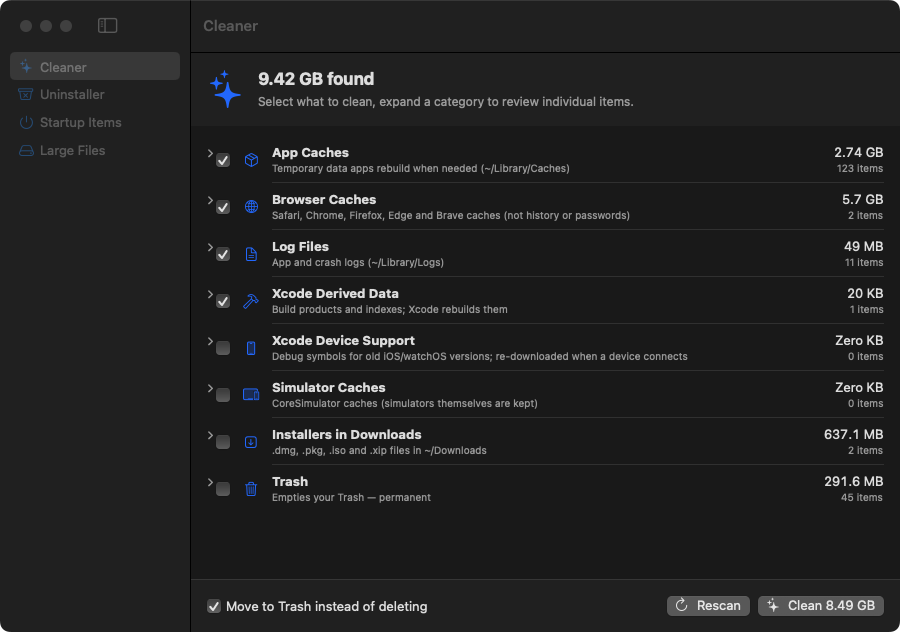
A cleaner should never surprise you. Tidy shows what it found, lets you untick anything, and asks once more before it moves a single file.
Each tab does one job well. Scan, review the list, untick what you want to keep, then clean.
Scans the places Macs quietly fill up, with a size for each and a list you can expand.
Removes an app along with the support files, caches and preferences it left behind in ~/Library, matched by its bundle ID.
Shows the launch agents and daemons that start with your Mac with their current status. Remove the login agents that belong to you.
Pick a folder and a size, from 100 MB to 5 GB. Results appear as the scan runs, biggest first.
Tidy is ad-hoc signed and not yet notarized by Apple, so the first launch takes one extra click.
Download Tidy and drag it into your Applications folder.
The first time, right-click Tidy and choose Open, then Open again. After that it opens normally.
Pick a tab, review what Tidy found, and clean the items you choose.
Tidy runs on macOS 14 Sonoma or later. It works without extra permissions; give it Full Disk Access in System Settings → Privacy & Security if you’d like it to look into Safari’s cache and the Trash as well.
Yes. Caches are temporary data that apps rebuild when they need it. An app may feel a little slower the first time you open it after cleaning.
Cleaned files go to the Trash by default, so you can put them back from there. If you turn off “Move to Trash instead of deleting”, or choose to empty the Trash, that part is permanent and Tidy warns you first.
Tidy isn’t notarized by Apple yet. Right-click the app, choose Open, and confirm. You only need to do this once.
No. Most of Tidy works without it. Full Disk Access only lets it scan a few protected places, such as Safari’s cache and the Trash.
App Store apps run in a sandbox that can’t reach other apps’ caches and leftovers, which is exactly what a cleaner needs to do.
No. Tidy has no account, no analytics and doesn’t send anything anywhere. It only looks at files on your Mac.
For Mac · macOS 14 Sonoma and later · First launch: right-click → Open